Features
Tray and Notch
The system tray menu and the Notch, a small player pinned to the top of the screen.
Tray
Nuvo adds a tray icon on desktops that provide a StatusNotifier watcher. The menu shows the current track and:
- Play or pause
- Next and previous
- Like or unlike
- Show Nuvo
- Reset appearance (safe mode)
- Quit
Settings has a close-to-tray option.
Notch

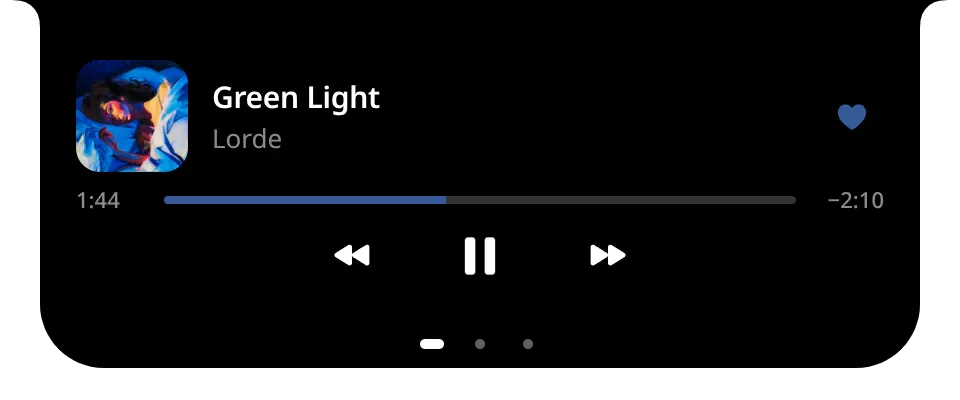
The Notch is a small black island at the top centre of your screen. It shows the cover, the title and artist, and a progress bar. It expands into a mini player with controls, the next tracks and the current lyric line.
Where it works
A Wayland client can only pin itself to the top when the compositor allows it.
| Session | Notch |
|---|---|
| KDE Plasma (Wayland) | Yes, placed with a KWin script |
| Hyprland | Yes |
| Sway | Yes |
| Any X11 session | Yes |
| GNOME (Wayland) | No. Use the system media widget, fed by the MPRIS session. |
| Other Wayland compositors | No |
Settings, Notch shows the detected session.
Settings
- Show the Notch: Automatic, Always or Never. Always is refused where the session cannot place it.
- Expand on hover or on click.
- Show the current lyric line.
- Announce track changes.
- Which display it lives on: where Nuvo is, or the primary display.
The Notch lives on one display. Clicks outside the island pass through to the windows below.